What Is Backlink Management, and How Do You Actually Do It Right?
Written ByReviewed byUpdated


On this page
- What backlink management actually is (and what it isn't)
- A plain definition
- The four jobs it covers
- What it is NOT
- Why backlink management matters (six ways teams get burned)
- Links die, and you paid for them
- Knowledge walks out the door when people leave
- What is simple at 50 links is chaos at 5,000
- Migrations and redesigns quietly break your best links
- Reporting season and defending the budget
- Vendor and exchange accountability
- The toxic-link myth: what Google actually says about disavow
- What the standard advice gets wrong
- Google's own words
- When disavow actually applies
- What to do with that time instead
- The system of record: what to track for every link
- Group 1: Identity (what the link is)
- Group 2: Health (is it alive and working?)
- Group 3: Authority (is it worth keeping?)
- Group 4: Provenance (the "years later" fields)
- By acquisition source: the extra fields each type needs
- How to run it efficiently: the workflow
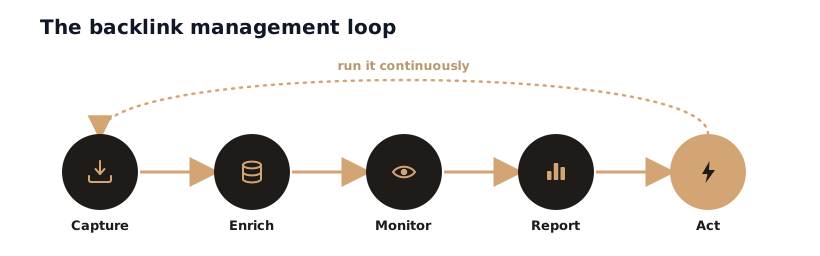
- Capture: log every link the moment it goes live
- Enrich: add the metrics and provenance
- Monitor: set a cadence that matches link value
- Report: build the view each stakeholder needs
- Act: when something changes, fix it fast
- Backlink management by role
- The solo founder or small team
- The in-house SEO or team lead
- The freelance link builder
- The agency
- Two ways to run it: a spreadsheet or a monitoring tool
- Start with a spreadsheet (and the fields to use)
- Where the spreadsheet breaks down
- When to graduate to a tool
- Common backlink management mistakes to avoid
Backlink management usually gets taught as two chores: run an audit, then disavow your "toxic" links. Both are off, and the disavow half is wasted effort for nearly every site (Google says so itself, further down).
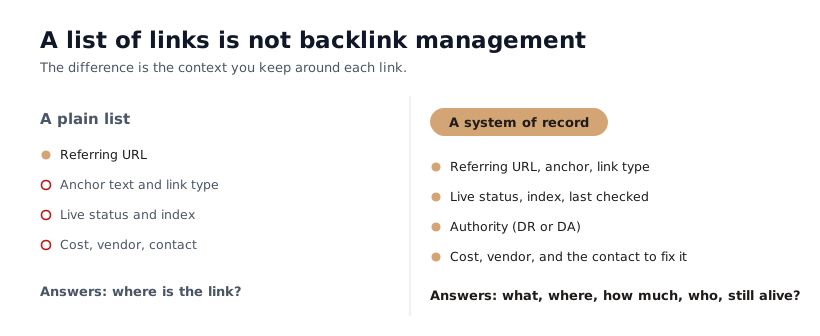
The useful version is simpler. Backlink management is keeping a living record of every link you have earned, bought, or exchanged, so that at any moment, no matter who is on the team or how many years have passed, you can answer three questions: What links do we have? Are they still live and working? And if one breaks, what did it cost and who do we contact to fix it?
That is the whole job. Not a one-time cleanup. A system you run.
This guide shows you what to track, how to run it efficiently, how it changes depending on whether you are a solo founder or a 20-person agency, and when a spreadsheet is enough versus when you need a tool. No filler.
What backlink management actually is (and what it isn't)
A plain definition
Backlink management is the ongoing practice of tracking every backlink pointing to your site as an asset: recording where it came from, watching whether it stays live and dofollow, and acting when it changes. The keyword is ongoing. A backlink is not a trophy you win once. It is a fragile thing on someone else's website that can be edited, removed, or broken at any time, without telling you.
The four jobs it covers
Strip away the jargon and backlink management is four repeating jobs:
- Inventory. Keep one trustworthy list of every link, with its context (cost, source, contact, date).
- Monitor. Check each link on a schedule so you notice when one is removed, turned nofollow, or deindexed.
- Report. Pull the view a client, a boss, or future-you needs, on demand.
- Act. When a link breaks, use the record to reclaim, redirect, or replace it fast.
Everything else (audits, disavow, anchor analysis) is a subset of these four.
What it is NOT
It is not a single annual audit. Auditing once a year tells you what broke nine months ago, which is too late. It is also not a frantic hunt for toxic links to disavow. That advice is everywhere, and for the typical site it is busywork. The work that matters is protecting the links you spent time and money to earn.
Why backlink management matters (six ways teams get burned)
"Links help rankings" is true and useless. Managing them is what keeps your SEO steady, and the situations below are the ones that bite the teams who skip it.
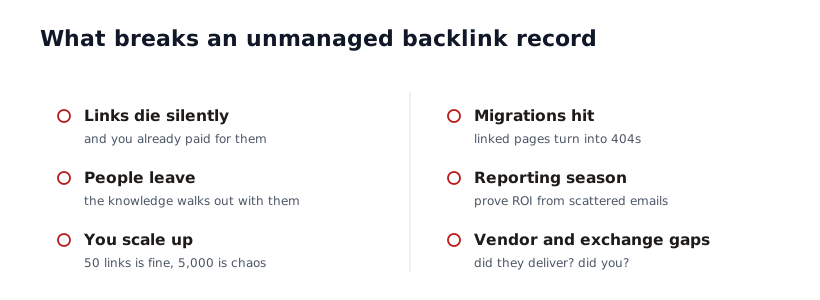
Links die, and you paid for them
Backlinks rot. Ahrefs tracked links to more than two million sites and found 66.5% of them dead within about a decade, and a separate monitoring study found roughly 18% of acquired links gone within the first year (full numbers in our link building statistics roundup). Now attach money to that. A guest post averages $295 bought direct and a high-quality placement averages $3,130. Every link that silently 404s or flips to nofollow is that spend evaporating with no refund and no alert.
Use case: you paid an agency for 20 links last year. Eight months later, six are gone and three were never indexed by Google. You are still paying the retainer, and nobody noticed.
Knowledge walks out the door when people leave
Few teams plan for this one. The person who built or bought your links keeps the working record in their head, their inbox, and a spreadsheet on their own drive. When they leave, all of it leaves with them.
Use case: your best link builder quits. Six months later a $2,000 placement disappears. Nobody knows the site, the editor's email, the campaign it came from, or that the link ever existed. It is unrecoverable because it was never written down anywhere the team could reach.
A system of record turns tribal knowledge into company property. It survives the person.
What is simple at 50 links is chaos at 5,000
Fifty links you can hold in your head. Five thousand across twelve clients and three of your own sites, you cannot. As the company grows or the client roster expands, ad-hoc tracking collapses into a pile of conflicting spreadsheets. Growth is exactly when you need separation: a clean boundary per client and per campaign, so one does not bleed into another.
Migrations and redesigns quietly break your best links
When you change your site, you can break your own backlinks. A CMS move, a domain change, or a URL restructure can turn the pages other sites link to into 404s overnight. The fix is redirects, but you can only redirect what you know about.
Use case: you migrate to a new CMS and 40 of your highest-authority backlinks now point to dead URLs, because nobody had a list of which pages carried valuable links to protect. Rankings slide for a quarter before anyone connects the dots.
Reporting season and defending the budget
Every client and every boss eventually asks the same question: what did we get for the money? Without a record, that question costs you days of digging through old emails and exports.
Use case: a client asks "what did our $6,000 last quarter actually buy?" With a managed system you export the answer in two minutes: every link, its authority, its status, its cost. Without one, you lose two days and still look disorganized.
A clean record is also how you grow a budget. "Here are 84 live links averaging DR 52 that we built for $14k" is an argument. "Trust me, it's working" is not.
Vendor and exchange accountability
If you buy links or trade them, management is how you hold the other side accountable. Did the agency deliver the links they invoiced? Are they still live months later? And for exchanges, did you keep your side of the deal?
Use case: an exchange partner pulls your link because you never delivered the reciprocal one you promised three months ago. You forgot. It was in a DM. A tracker with a "reciprocal link owed" field would have caught it.
This is the pain that compounds quietly, and it is exactly what a system of record exists to prevent.
Stop finding out about dead links three months too late
The toxic-link myth: what Google actually says about disavow
Before the how-to, clear out the most over-taught idea in backlink management. It frees up the time you should spend on the rest.
What the standard advice gets wrong
Search "backlink management" and you will be told to audit for "toxic" links and disavow them on a schedule. That advice is years out of date for normal sites. Google got much better at ignoring spam on its own, and chasing a "toxic score" from a third-party tool sends you hunting ghosts.
Google's own words
Here is Google's official guidance on the disavow tool, verbatim:
"In most cases, Google can assess which links to trust without additional guidance, so most sites will not need to use this tool."
Google also calls disavow "an advanced feature" that "should only be used with caution," because used wrong it can hurt your rankings. (Google Search Console Help.)
When disavow actually applies
There is a narrow, real case for it: you have a manual action for unnatural links (you would see it in Search Console), or you paid for spammy links you cannot get removed and expect a penalty. That is it. If you do not have a manual action and you have not been buying junk at scale, you almost certainly do not need to disavow anything.
What to do with that time instead
Spend it on the links that matter: the ones you worked to earn. Monitoring whether your real backlinks stay live and dofollow protects far more value than disavowing random forum links that Google already ignores. That reframing is the difference between busywork and backlink management.
The system of record: what to track for every link
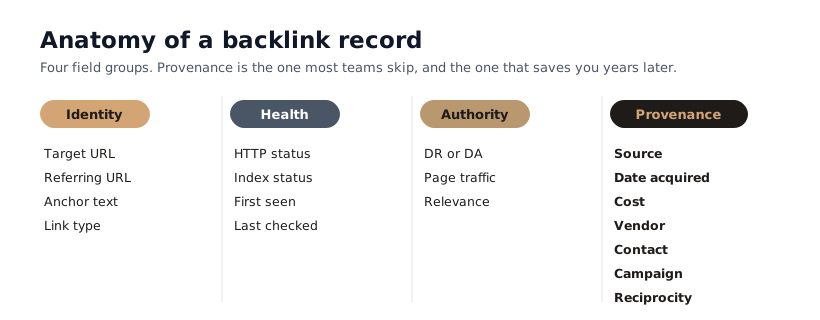
This is the core of the whole discipline. A backlink record that only stores the URL is a bookmark. A record that survives team changes and answers "what, where, how much, and who" is an asset register. The fields that make the difference fall into four groups.
Group 1: Identity (what the link is)
The basics that define the link itself:
- Your target URL. The page on your site the link points to.
- Referring page URL. The exact page the link lives on (not just the domain).
- Anchor text. The clickable words, exactly as they appear.
- Link type. Dofollow, nofollow, sponsored, or UGC. This decides whether it passes authority.
Group 2: Health (is it alive and working?)
The fields you monitor, because they change without warning:
- HTTP status. 200 means live; 404 or 410 means the page is gone.
- Index status. Is the referring page in Google's index? An unindexed link passes no SEO value, so this is make-or-break and often skipped.
- First seen. When the link went live (or when you first logged it).
- Last checked. The timestamp of your most recent check, so you trust the data.
Group 3: Authority (is it worth keeping?)
The quality signals, checked once and refreshed occasionally:
- Domain Rating or Domain Authority. A directional measure of the linking domain's strength (DR from Ahrefs, DA from Moz).
- Referring page traffic. A link on a page real people visit is worth more than one on a dead page.
- Topical relevance. Is the linking site actually related to yours? A relevant DR 40 often beats an unrelated DR 80.
Group 4: Provenance (the "years later" fields)
This is the group every generic guide ignores, and it is the one that saves you when memory and people are gone:
- How you got it. Earned, guest post, digital PR, link exchange, partnership, or bought.
- Date acquired. When you actually got it.
- Cost. What you paid, if anything. This is your ROI math later.
- Vendor or agency. Who placed it, so you can hold them accountable or reorder.
- Contact. The editor, webmaster, or partner, and their email. This is who you message when the link breaks.
- Campaign. Which initiative it belongs to, so reporting groups cleanly.
- Reciprocity status. For exchanges: do you owe a link back, and did they keep yours?
By acquisition source: the extra fields each type needs
Different links need different provenance. Match the extra fields to how you got the link:
| If you got the link by... | Track these extra fields |
|---|---|
| Link exchange | Partner domain, the reciprocal link you owe or were given, reciprocity status |
| Digital PR | Journalist or author name, publication, the campaign or story angle |
| Guest post | Author byline used, editor contact, submission and publish dates |
| Bought (agency or marketplace) | Vendor, price, what was promised, invoice reference |
| Partnership | Partner company, agreement terms, renewal or review date |
| Earned (organic) | The page or asset that attracted it, so you can make more like it |
How to run it efficiently: the workflow
A system is only useful if running it is a habit, not a project. The five-step loop below keeps the record current without eating your week.
Capture: log every link the moment it goes live
The biggest failure in backlink management is delay. A link you mean to log "later" is a link you will forget. Make capture the last step of every placement: the second a guest post publishes or a vendor reports a link, it goes into the record with its source, cost, and contact while you still remember them.
Enrich: add the metrics and provenance
Once captured, fill the health and authority fields: status, index, DR, relevance. This is also when you tag the provenance group. Enriching in batches (say, weekly) is fine; capturing is what must be immediate.
Monitor: set a cadence that matches link value
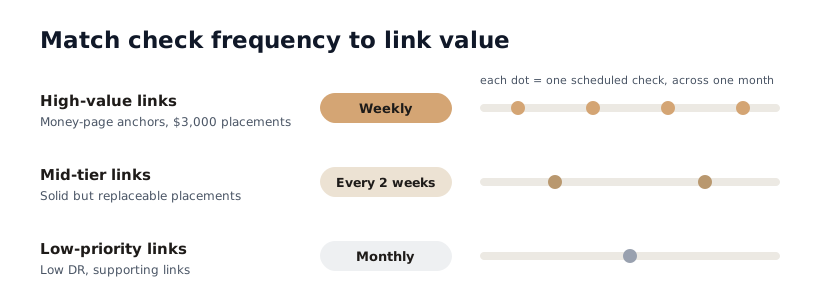
You do not need to check every link every day. Match frequency to value:
- High-value links (your $3,000 placements, money-page anchors): check weekly, or daily during a sensitive campaign.
- Mid-tier links: check every two weeks.
- Low-priority links (tier-2, low-DR): check monthly.
This is where a tool earns its keep, because checking 2,000 links by hand on any schedule is not realistic.
Report: build the view each stakeholder needs
Different audiences want different cuts of the same record. A client wants live links, authority, and what they paid. A boss wants totals and trend. You want what broke this week. If your record is structured, every one of these is a filter, not a rebuild.
Act: when something changes, fix it fast
This is where the record pays off. A link drops, you get an alert, and because the record holds the contact and context, you email the editor the same day: "Hi, the link to our guide in your article seems to have been removed in a recent edit, could you restore it?" Caught in a day, that link comes back. Caught in a quarter, it is usually gone for good.
Backlink management by role
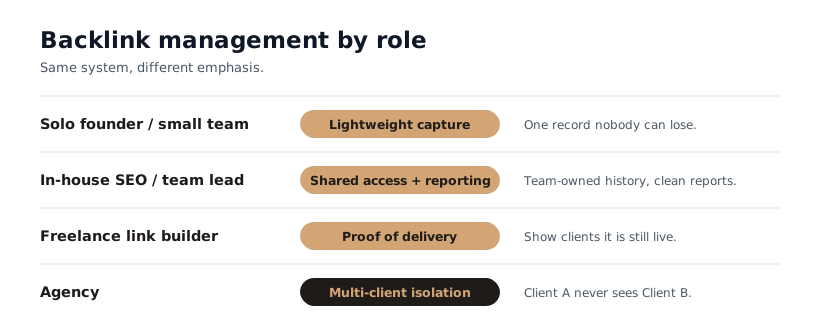
The system is the same; the weight on each part shifts depending on who you are.
The solo founder or small team
You wear every hat, so keep it lightweight. You do not need enterprise tooling on day one. You need a single record nobody can lose, capturing the basics (link, source, cost, contact) plus monitoring so a dropped link does not slip past you while you are busy running the business. The trap here is keeping it all in your head. The day you hire or hand off, that record is the difference between continuity and starting blind.
The in-house SEO or team lead
Your priorities are shared access and reporting upward. The record has to be the team's, not one person's, so turnover does not erase history. And you need clean reports for leadership that defend and grow the link-building budget. Roles matter here: the people adding links should not be able to wipe the history.
The freelance link builder
Your record is your proof of work. Clients pay you to build links; the way you keep the relationship (and get the next invoice approved) is showing exactly what you delivered and that it is still live. Tracking cost, status, and your own placements per client turns "trust me" into a report.
The agency
Everything above, multiplied by your client count, plus one hard requirement: isolation. Client A must never see Client B's vendors, costs, or strategy, and a freelancer you bring in for one client must not see the others. This is where loose spreadsheets become a liability (and a confidentiality risk), and where per-client separation stops being nice-to-have.
Two ways to run it: a spreadsheet or a monitoring tool
You do not need to buy anything to start. You do need to be honest about where a spreadsheet stops working.
Start with a spreadsheet (and the fields to use)
For a solo founder or anyone under roughly 100 links, a spreadsheet is a perfectly good system of record. Build it with the four field groups above as columns: identity, health, authority, provenance. The discipline (capturing every link with its context) matters far more than the tool. A well-kept sheet beats an expensive tool nobody updates.
Where the spreadsheet breaks down
A spreadsheet has one fatal gap: it does not check anything for you. Every status, index, and authority value is something you update by hand. At 50 links that is an annoying afternoon. At 2,000 it is impossible, so it silently goes stale, and a stale record is worse than none because you trust it. Spreadsheets also leak across clients (a wrong tab, a shared file) and offer blunt, all-or-nothing access.
When to graduate to a tool
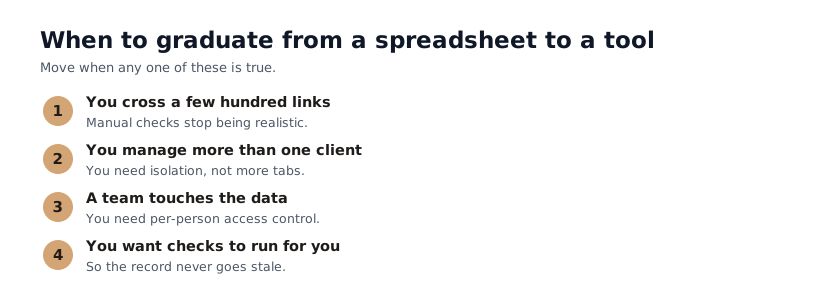
Move when one of these is true: you cross a few hundred links, you manage more than one client, you have a team touching the data, or you want to stop checking links by hand. A monitoring tool adds what a sheet cannot: automatic checks on a schedule, alerts the moment a link changes, and isolation per client.
Side by side:
| Spreadsheet | Monitoring tool | |
|---|---|---|
| Cost | Free | From around $10/mo |
| Logging links | Manual | Manual or CSV import |
| Status and index checks | Manual, one by one | Automatic, on a schedule |
| Alerts when a link changes | None | Email the moment it changes |
| Custom fields (cost, vendor, contact) | Yes, you build them | Yes, as custom columns |
| Multi-client isolation | Tabs and files, easy to leak | Separate workspaces per client |
| Team access control | Blunt (share the file) | Per-person, editor or view-only |
| Historical log | Whatever you remember to save | Automatic |
| Best for | Under ~100 links, solo | Scale, teams, and clients |
This is the gap LinkWatchr was built to close. It keeps the same system-of-record structure (with unlimited custom columns for cost, vendor, contact, campaign, and reciprocity), checks every link on the schedule you set, alerts you on removals, nofollow swaps, anchor changes, and deindexes, and isolates each client in its own workspace. It is the spreadsheet you would build if the spreadsheet could also watch your links for you.
Common backlink management mistakes to avoid
The failures are predictable. Avoid these and you are ahead of most teams:
- Logging links "later." Later never comes, and the context is gone by then. Capture at publish time.
- Tracking only the URL. A list of links with no cost, source, or contact cannot survive a single staff change.
- Auditing once a year. Annual is too slow. A link lost in February found in December cost you ten months of value.
- Obsessing over toxic links. For most sites, disavow is busywork. Watch the links you earned instead.
- Ignoring index status. A link on an unindexed page passes no value. Check it, ideally before you pay.
- One person owning the record. If it lives in someone's head or personal drive, it is one resignation away from gone.
- Confusing quantity with management. Five hundred unmonitored links is not a managed profile. Fifty watched ones is.
Backlink Management FAQs
What is backlink management?
Backlink management is the ongoing work of keeping a complete, current record of every backlink to your site, monitoring whether each one stays live and dofollow, and acting when one changes. Unlike a one-time backlink audit, it runs continuously, so a lost or altered link is something you catch in days, not months.
Is backlink management the same as link building?
No, and you need both. Link building acquires new backlinks. Backlink management protects the ones you already have: tracking their status, recording what they cost and who to contact, and reclaiming them when they break. Building without managing means quietly losing a share of what you paid for every year.
Does losing backlinks hurt your rankings?
It can. A lost high-authority link removes a ranking signal you were benefiting from, and rankings for the affected page can slip. Because two-thirds of links eventually die, the loss is gradual and easy to miss, which is exactly why monitoring matters: you catch and replace the important ones before the drop reaches your traffic.
Do I need to disavow toxic backlinks?
Almost certainly not. Google says "most sites will not need to use this tool" because it can judge which links to trust on its own. Disavow is only for sites with a manual action for unnatural links, or that bought spammy links at scale and cannot get them removed. For everyone else it is wasted effort, better spent monitoring the links you earned.
How often should I check my backlinks?
Match it to value rather than putting everything on one clock: weekly for your highest-value links, monthly for the rest, and daily only during a sensitive campaign. The practical catch is that manual checking falls apart past a few hundred links, which is when a monitoring tool starts to pay for itself.
What tools do you need to manage backlinks?
At minimum: Google Search Console (free, but it shows only a sample of your links and sends no alerts), a backlink monitor that checks each link's status and emails you when one changes, and an authority source like Ahrefs or Moz for DR or DA. Under roughly 100 links a structured spreadsheet is fine; past that, a tool like LinkWatchr does the checking and alerting for you.
Start monitoring today
Never lose a backlink again
Track every backlink automatically and get instant alerts the moment something changes.